
Why deliverability and HTML matter for AI companies today
For companies building smart AI systems, sending emails is a big deal. It’s how you share news about new products, tell people about your latest research, and talk to your investors.

But for these important messages to work, they first need to reach the right people’s inboxes. This is called email deliverability. When your email deliverability is good, more people see your messages. If not, your emails might go straight to spam or never show up at all. This means your hard work goes to waste, and you don’t get the results you want. Using the right email deliverability tools can make a huge difference here.
How your emails look also plays a key part in whether they are opened and read. This is where HTML coding comes in. The choices you make when you design your HTML email affect how it shows up in different inboxes. Bad HTML can make your email look messy, or even worse, it can make email filters think your message is spam. For professional audiences, like investors or fellow researchers, a clean, easy-to-read email is a must. Also, setting up things like Sender Policy Framework (SPF), Domain Keys Identified Mail (DKIM), and Domain-based Message Authentication, Reporting, and Conformance (DMARC) helps prove your emails are real and trusted, as explained in publications like Email Authentication Mechanisms: DMARC, SPF and DKIM.
This guide is here to help AI companies handle these important parts of email sending. We will connect the dots between technical rules, how you send emails every day, and smart HTML practices that work best for machine intelligence businesses. Our goal is to make sure your product news, research updates, and investor communications get seen and understood by your important contacts. If you are looking to improve your overall email strategy, you might find our Strategic AI Newsletter Guide For Investors And Founders very helpful. To get clear daily AI updates directly to your inbox, consider subscribing today.
The AI Newsletter Worth Reading
Authentication & Standards: SPF, DKIM, DMARC, BIMI and why they matter
Getting your emails delivered means proving you are who you say you are. This is where important tools like Sender Policy Framework (SPF), Domain Keys Identified Mail (DKIM), and Domain-based Message Authentication, Reporting, and Conformance (DMARC) come in.
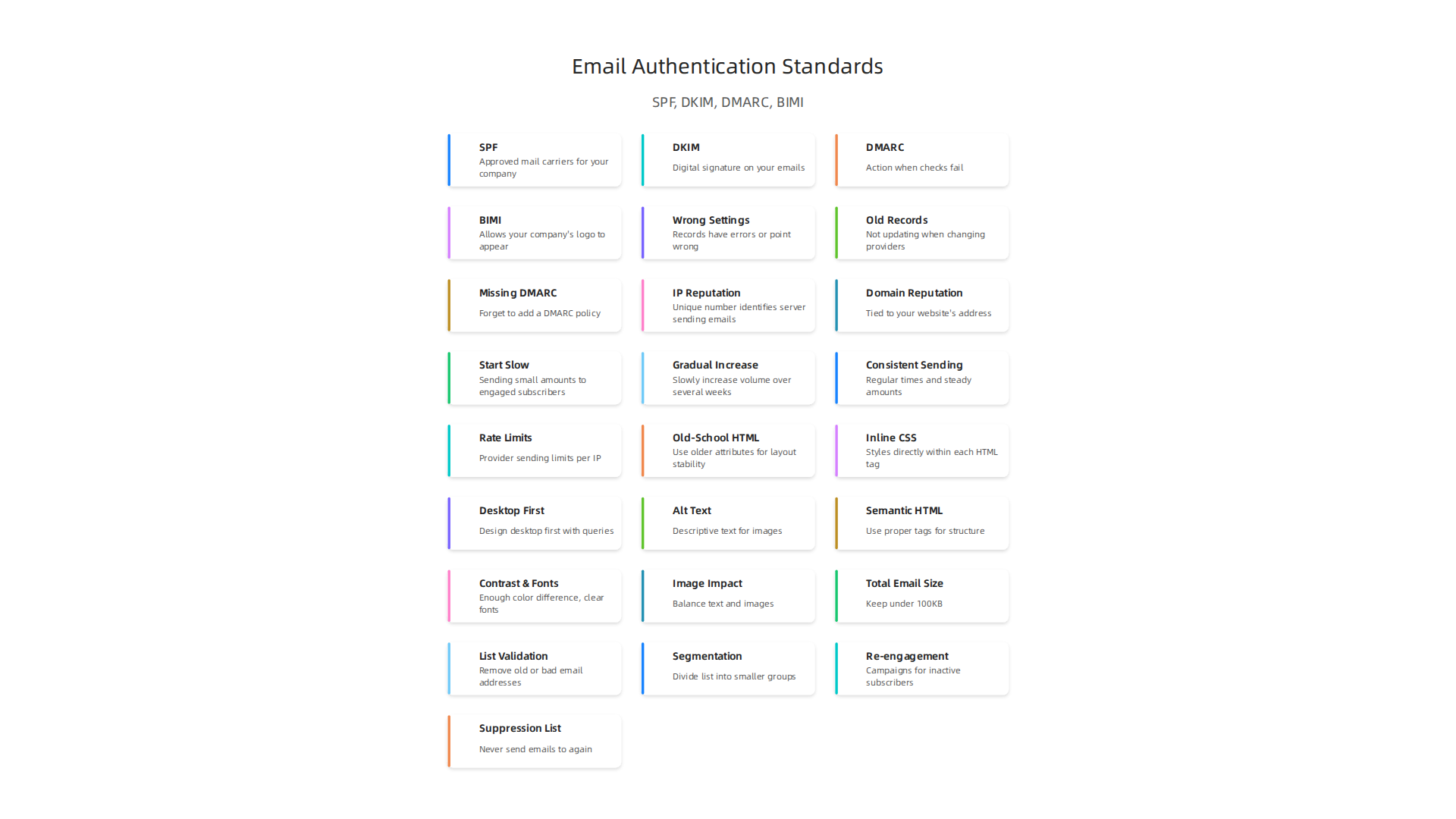
They are like digital IDs for your email. These tools help create trust and stop fake emails from being sent from your company’s name.
Let’s break them down:
- Sender Policy Framework (SPF): Think of SPF as a list of approved mail carriers for your company. You tell the internet which mail servers are allowed to send emails using your domain name. When another email server gets an email from you, it checks this list. If the server that sent the email is on your approved list, it helps show the email is real and not a scam. If it’s not on the list, the email might be marked as spam or rejected entirely.
- Domain Keys Identified Mail (DKIM): DKIM is like a digital signature on your emails. It adds a special hidden code to your email when you send it. The receiving mail server can then check this code to make sure the email hasn’t been changed along the way and that it truly came from your domain. Both SPF and DKIM work together to "watermark" your emails, making it hard for bad actors to send fake messages, as highlighted by CISA Insights on Enhance Email & Web Security.
- Domain-based Message Authentication, Reporting, and Conformance (DMARC): DMARC takes SPF and DKIM a step further. It tells receiving email servers what to do if an email fails the SPF or DKIM checks. Should it be put in spam? Rejected completely? Or just monitored? For DMARC to work well, you need to have SPF or DKIM set up correctly, or ideally, both. This helps improve your overall email deliverability. For more details on these vital protections, you can read about Trustworthy Email from NIST.
Add a brand touch with BIMI
Beyond these core tools, there is also Brand Indicators for Message Identification (BIMI). BIMI helps your brand stand out. When SPF, DKIM, and DMARC are all set up correctly, BIMI allows your company’s logo to appear next to your email in the recipient’s inbox. This instantly builds brand recognition and trust, making your emails more noticeable and professional.
Common mistakes that hurt deliverability
Even with the best email deliverability tools, mistakes can happen. Some common problems include:
- Wrong settings: If your SPF, DKIM, or DMARC records have errors, or if they point to the wrong email sending services, your emails might fail authentication.
- Old records: Not updating these records when you change email service providers can also cause issues.
- Missing DMARC policy: Some companies set up SPF and DKIM but forget to add a DMARC policy, which means mail servers don’t know how to handle unauthenticated emails.
These problems can make your important messages land in spam folders, even if you have great content. An email marketing specialist often helps companies make sure these settings are correct. Using these authentication methods wisely is a key part of ensuring your HTML email messages reach their audience. If you are looking to get the most out of your email efforts, understanding these details can help you maximize AI insights with focused email marketing automation in 2026.
Even with perfect authentication setup, your emails might not reach the inbox if your sending infrastructure isn’t strong. Think of your email sending as a journey. Your IP address and domain name are like the car and the driver. Their reputation matters a lot for good email deliverability.
IP Reputation vs. Domain Reputation
These are two different but important things for your email deliverability:
- IP Reputation: Your IP address is like the car’s license plate. It’s the unique number that identifies the server sending your emails. If that server has sent a lot of spam in the past, or if it suddenly sends a huge number of emails to bad addresses, its reputation goes down. Mail providers will then be wary of emails from that IP, often sending them to spam folders or blocking them completely.
- Domain Reputation: This is like the driver’s reputation, tied to your website’s address (your domain, like yourcompany.com). This reputation builds over time based on how people interact with emails from your domain. Do they open them? Do they click links? Do they mark them as spam? If people often mark your emails as spam, your domain’s reputation will suffer, making it harder for your future emails to land in the inbox.
Both reputations work together. A good IP with a bad domain, or a bad IP with a good domain, can both hurt your chances. Together, they are essential email deliverability tools for success, especially in 2026 where the global average inbox placement rate is around 83-85%, meaning many emails still don’t make it to the main inbox.
Warm-up Strategies for New IPs and Domains
When you get a new IP address or start sending emails from a brand-new domain, it has no history. Mail providers don’t know if you’re a good sender or a bad one. To build trust, you need to "warm up" your IP and domain.
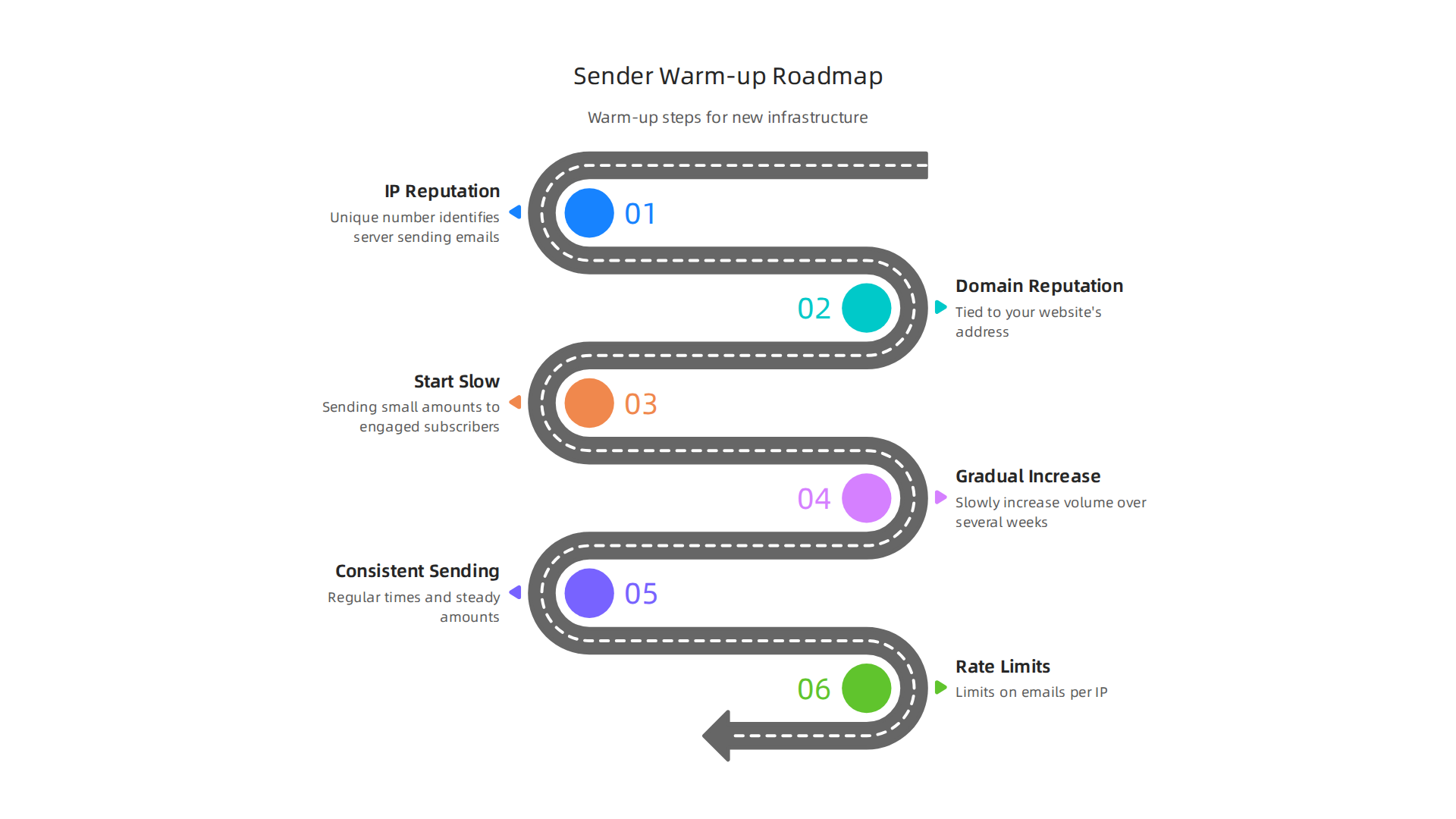
This means starting slow and sending small amounts of html email to your most engaged subscribers first. Then, slowly increase the volume and reach a wider audience over several weeks. This consistent, gradual sending helps show mail providers that you are a legitimate sender. If you suddenly send millions of emails from a new IP, it looks like spam, and you’ll likely get blocked. An email marketing specialist often helps plan these warm-up schedules.
Sending Patterns, Rate Limits, and Throttling
The way you send emails also impacts deliverability.
- Consistent Sending: Sending emails at regular times and in steady amounts helps build trust. Mailbox providers learn to expect your emails.
- Rate Limits: Mail providers have limits on how many emails an IP can send to them in a certain amount of time. If you send too many too fast, they might "throttle" you, meaning they slow down or temporarily block your emails.
- Throttling: This is when a mail server tells your sending server to slow down. It’s like a traffic cop asking you to reduce your speed. If you ignore it, your emails might get rejected.
Understanding these details is key to making sure your messages get seen. Staying on top of trends and insights, especially in the fast-changing world of AI and technology, is just as crucial for your business as good email practices.
Get clear daily AI updates from The Deep View Newsletter.
The AI Newsletter Worth Reading
Beyond how you send, what you send also matters a lot. The way your HTML email is designed and coded plays a big part in if it lands in the inbox and how readers see it. Even with perfect sending setup, poorly made emails can end up in spam or look broken.
Key HTML/CSS Techniques for Good Emails
Email programs, like Outlook or Gmail, are not all the same. They can show emails differently. To make sure your emails look good everywhere in 2026, you often need to use older HTML tricks and careful coding.
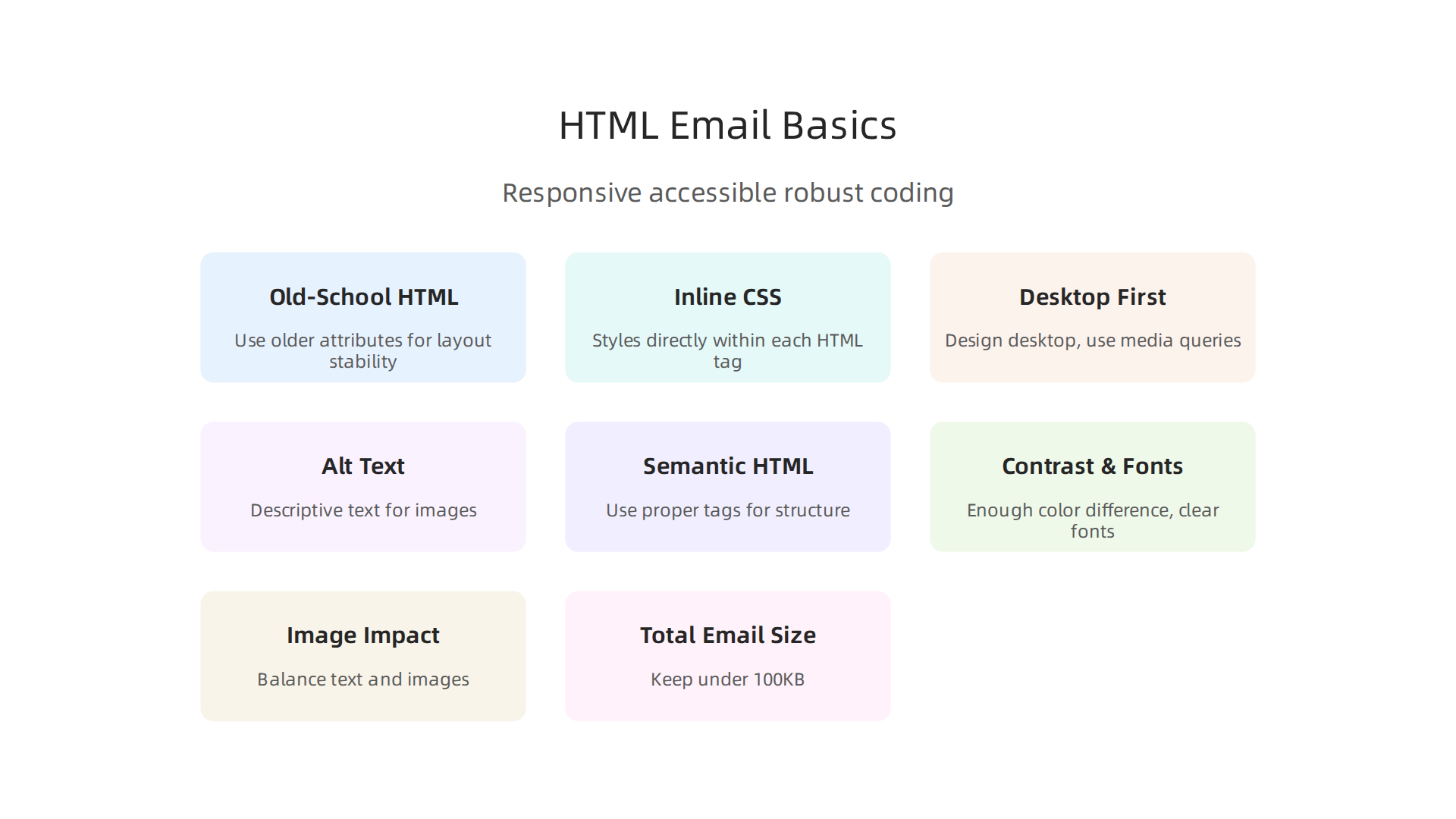
- Stick to Old-School HTML: Many email clients still rely on older HTML attributes like
cellpadding,cellspacing, andborderfor tables. Setting these attributes, especiallycellspacing="0"andborder="0"on tables used for layout, helps prevent unwanted gaps and lines. You should intentionally setcellpaddingtoo, as some clients ignore CSS spacing. This ensures your html email shows up as you planned it, according to email HTML best practices for 2026 providers Perfect Email HTML: Best Practices for 2026. - Inline CSS is Your Friend: Unlike websites, emails often need CSS styles written directly within each HTML tag (inline styles). This helps your styling work in more email programs because many of them strip out or ignore CSS written in other places.
- Design for Desktop First: A common strategy for responsive emails is to design for a desktop view, usually around 600-640 pixels wide. Then, you use special CSS rules (called media queries) to change how the email looks on smaller screens like phones. This ensures your email looks good no matter where it’s viewed HTML Email Best Practices 2026: Templates That Work in Every Client.
Accessibility and Semantic Markup
Making emails easy for everyone to read is a must for professional messages. This includes people who use screen readers or have vision problems.
- Alt Text for Images: Always add descriptive "alt text" to your images. Many email programs block images by default. If your image can’t be seen, the alt text tells the reader what it’s about. For images that are just for looks, use empty alt text (like
alt="") so screen readers skip them Accessible Email HTML: Build Emails That Everyone Can Read. - Semantic HTML: Use proper HTML tags like
<h1>for main titles,<p>for paragraphs, and<ul>or<ol>for lists. This helps screen readers understand the structure of your email. For tables used just for layout, addrole="presentation"so screen readers don’t try to navigate them like data tables HTML Email Accessibility: A Developer Guide. - Contrast and Fonts: Make sure there’s enough difference in color between your text and its background. Use clear, easy-to-read fonts at a size that isn’t too small, like 16 pixels or larger for body text.
How Images, Fonts, and Media Choices Affect Deliverability
The choices you make about visuals also affect if your email reaches the inbox and how fast it loads.
- Image Impact: Too many large images can make your email slow to load or even flag it as spam. Balance text and images. If images are blocked, your email should still make sense. An email marketing specialist knows these are important [email deliverability tools].
- Web-Safe Fonts: Stick to common "web-safe" fonts like Arial, Helvetica, or Times New Roman. These fonts are on most computers and will show up correctly. If you use a special font, it might be replaced with a basic one, which can change your design.
- Total Email Size: Try to keep your email’s total file size under 100KB. Emails that are too big can get clipped by programs like Gmail, meaning parts of your message won’t be shown to the reader.
After getting your HTML email just right, the next big step is to know if your emails actually reach people’s inboxes. This is where special tools come in handy. Even with great email design and coding, you need to check that your messages are getting through. In 2026, the average email inbox placement rate is around 89% across different industries, but top performers aim for much higher, often above 93% or even 95% Email Deliverability Benchmarks 2026: Industry Report. This shows that there is still a chance your emails might not land where you want them.
Choosing and Using Email Deliverability Tools (monitoring, validation, feedback)
To make sure your emails are always reaching your audience, you’ll need the right email deliverability tools. These tools help you see how well your emails are doing and what you can do better.
Types of Email Deliverability Tools
There are a few main kinds of tools that help with email deliverability:
- Deliverability Monitoring: These tools watch your emails after you send them. They tell you if your emails land in the inbox, go to spam, or bounce back. They often show you what different email providers, like Gmail or Outlook, are doing with your messages.
- List Hygiene and Validation: Before you even send an email, these tools check your email list. They help remove old or bad email addresses. This stops your emails from bouncing and keeps your sender reputation strong.
- ESP Analytics: Your email service provider (ESP) also offers reports. These reports show you how many people opened your emails, clicked links, or marked your email as spam. This data is key for understanding how your audience likes your content.
- Inbox Placement Testing: Some tools send your email to a special set of email addresses (called seed lists) across many different email providers. This shows you exactly where your email lands in each inbox, giving you a sneak peek before you send to everyone else.
How to Pick the Right Tools
When choosing email deliverability tools, think about these things:
- Data Sources: Where do the tools get their information? Do they use real-time data from many email providers?
- Seed Lists: For inbox placement, how big and varied are their seed lists? A good list covers all the major email services your customers use.
- Reporting: Can you easily understand the reports? Do they give you simple, clear info about what’s happening with your emails?
- Alerts: Do the tools tell you right away if something goes wrong, like if your emails start going to spam more often?
An experienced email marketing specialist knows how important these features are.
Putting Tools to Work Every Day
Once you have your email deliverability tools, you need to use them regularly.
- Dashboards: Most tools have a main screen, or dashboard, that shows you important numbers at a glance. Check this often to keep an eye on your email health.
- Regular Checks: Make it a habit to check your deliverability reports daily or weekly. This helps you spot problems early.
- Team Reports: Share what you learn with your team. Everyone involved in sending emails, from writers to designers, should know how their work affects deliverability.
Using these tools helps you make sure your messages get to your audience. For those leading AI efforts, understanding effective communication channels like newsletters is vital. Find out more about building impactful newsletters with a Strategic AI newsletter guide for investors and founders.
Staying informed about the latest in AI and technology can also help you make smarter decisions about your email strategy.
Get clear daily AI updates from The Deep View Newsletter.
The AI Newsletter Worth Reading
Now that you know how important email deliverability tools are, it’s time to talk about how you actually test your emails. This is where inbox placement tests come in handy. These tests are like a practice run before you send your main email campaign.
Testing & Inbox Placement: Seed Lists, Spam Filters, and Interpreting Results
To really know if your emails will land in the right spot, you need to set up good tests. This often involves using "seed lists." A seed list is a group of test email addresses you control, spread across many different email providers like Gmail, Outlook, and Yahoo. When you send your email to this seed list, specialized email deliverability tools can tell you exactly where your email landed in each inbox: the main inbox, a special tab (like Promotions in Gmail), or even the spam folder.
Designing Good Inbox Placement Tests
For these tests to be helpful, you need to design them well.
- Choose the Right Seed List: Make sure your seed list has email addresses from all the major email services your customers use. This helps you see a full picture of how your emails perform across different providers How to use email seed list testing effectively. Some experts even suggest having a mix of active and less active accounts to see how engagement affects placement Inbox Placement Testing — Seeds & Tools.
- Send Real Emails: Always send your actual email campaign content to the seed list. This means using the same subject line, images, links, and sending details you plan to use for your real audience Inbox Placement Test With Email Spam Checker Signals.
- Test More Than Once: It’s a good idea to run several tests across different days and times. This helps you get a truer idea of your email’s performance, as inbox rules can change Inbox Placement Test: Diagnose & Improve Deliverability.
- Use Realistic Accounts: When setting up seed list accounts, avoid names like "[email protected]." Instead, use names that look like real people’s emails. This helps mimic how real inboxes behave How do you test inbox placement across different email providers?.
Understanding Spam Folder Placement
If your email lands in the spam folder during a test, that’s a red flag. It means something is making email providers think your message is unwanted.

This could be because of:
- Your Sender Reputation: If you’ve had problems before, like many people marking your emails as spam, your sender reputation might be low. This makes it harder for your emails to reach the inbox.
- Content Issues: Too many spammy words, lots of capital letters, or strange links can trigger spam filters.
- Authentication Problems: If your email isn’t properly authenticated, email providers might not trust it.
Email providers also look at how people interact with your emails. If many people open, click, and reply, it tells providers your emails are good. If people ignore or delete your emails without opening them, that’s a negative signal. In 2026, a "good" inbox placement rate is usually 85% or higher, while top performers aim for 93% and up Email Deliverability Benchmarks 2026: Where Do You Stand?. If you’re consistently below 80%, it’s a sign that you need to investigate your sender reputation, email list quality, and how your emails are authenticated Email Deliverability Benchmarks 2026 | SenderReputation.org.
Fixing Deliverability Issues
Once your tests show problems, you need to fix them. Here’s how to prioritize:
- Clean Your Email List: The first step is to remove any bad or old email addresses. Tools that check your email list can help you make sure all addresses are valid. This is called list hygiene and it prevents your emails from bouncing Email list hygiene: suppress, sunset, or remove.
- Check Email Setup: Make sure your email is set up correctly, including how it’s authenticated. This tells email providers that you are who you say you are.
- Review Your Content: Look closely at your email’s words, links, and images. Is anything too salesy or likely to trigger spam filters? An email marketing specialist can help you fine-tune your messages.
- Watch Your Sender Reputation: Keep an eye on your overall sending history. Sending consistent, valuable emails to an engaged audience will help improve your reputation over time.
By regularly using email deliverability tools and acting on the test results, you can make sure your messages consistently reach your audience. Staying updated on the latest AI trends can also offer crucial insights for improving your digital strategy, making it easier for leaders and investors to make smart decisions. To stay informed, consider exploring resources on AI Trends 2026 The Crucial Insights for Leaders and Investors.
A clean email list is like a healthy garden for your email campaigns. If you have too many bad email addresses, your emails won’t reach the right people. This hurts your sender reputation and makes it harder for good emails to get through.
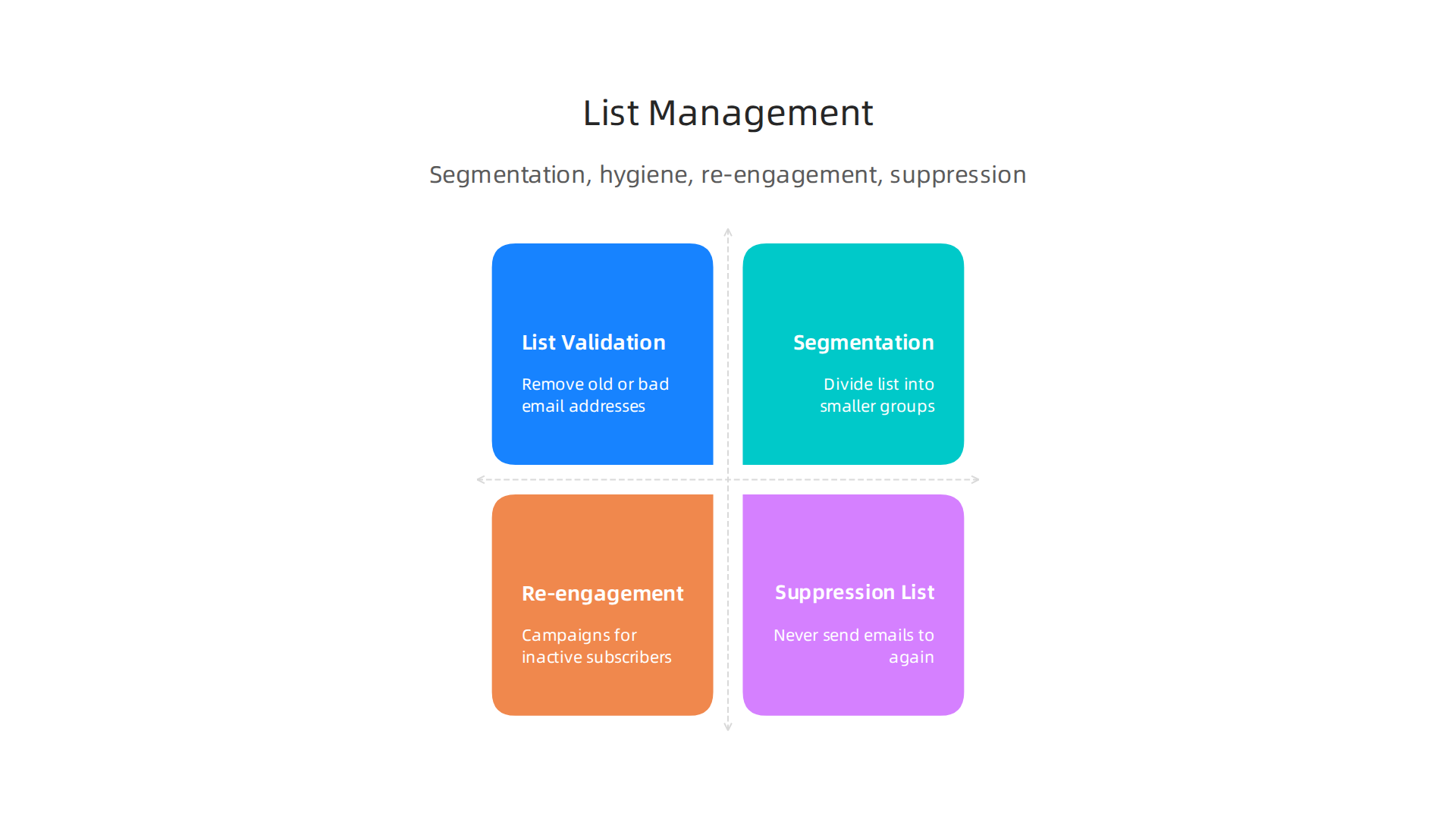
Good "data hygiene" and "list management" are super important to keep your email campaigns working well.
Keep Your List Clean with Validation
List hygiene means making sure all the email addresses on your list are real and active. Imagine sending mail to an empty house. That’s what happens when you send to a bad email address. These "bounces" tell email providers that you might not be managing your list well. Too many bounces can make your "email deliverability" suffer.
Special tools can help you check your email list. They look for typos, old addresses, and even "spam traps" which are fake email addresses used to catch senders who don’t clean their lists. Removing these bad addresses protects your sender reputation and ensures your messages have a better chance of landing in the inbox.
Smart Sending with Segmentation
Not all your subscribers are the same. That’s why "segmentation" is so helpful. It means dividing your big email list into smaller groups based on what people like, where they live, or how they’ve interacted with your emails before. For example:
- New Customers: Send them welcome emails and tips.
- People who clicked a certain link: Send them more info on that topic.
- Customers who haven’t bought in a while: Offer them a special deal.
When you send emails that are just right for each group, people are more likely to open them and click on links. This increased engagement tells email providers that your emails are valuable, which boosts your overall email deliverability. Using automation for these tasks can really help your "email marketing" efforts. You can learn more about how to maximize AI insights with focused email marketing automation in 2026.
Getting Back in Touch with Re-engagement
Sometimes, people stop opening your emails. They might still be on your list, but they’re not engaged. This is where "re-engagement" campaigns come in. You can send a special series of emails to these inactive subscribers. Ask them if they still want to hear from you. Offer them something valuable to get them interested again.
If they still don’t open or click after a few re-engagement attempts, it’s best to remove them from your active sending list. This might seem strange, but it actually helps your email deliverability. Sending emails to people who don’t want them hurts your sender reputation.
Protecting Your List with Suppression
A "suppression list" is a very important part of list management. It’s a list of email addresses that you should never send emails to again. This includes people who:
- Have asked to unsubscribe.
- Have marked your emails as spam.
- Had emails bounce too many times.
Even if these addresses accidentally get added to your main list, your email deliverability tools should automatically stop emails from going to anyone on your suppression list. This is a key step to reduce long-term risk and keep your sending practices healthy.
By taking good care of your email list, cleaning it regularly, and sending smart, relevant messages, you’ll make sure your email marketing efforts pay off.
Curious about how AI is changing the email landscape and other tech trends? Get clear daily AI updates from The AI Newsletter Worth Reading.
Good email practices go beyond just cleaning your list. You also need to follow the rules and listen to what email providers tell you. This means understanding privacy laws and using special reports to keep your emails landing where they should.
Following the Rules: Consent and Privacy
Sending emails isn’t just about getting your message out there; it’s also about respecting people’s privacy. Different countries have different laws about sending marketing emails. For example, in Europe, the GDPR (General Data Protection Regulation) is very strict. It says you must get clear permission, known as "consent," before sending someone marketing emails. This consent needs to be specific and easy to prove. You can’t just assume someone wants your emails; they have to say "yes" actively, perhaps by checking a box that isn’t pre-filled. Not only do you need consent, but you also need to keep records of how and when that consent was given, which is a key part of email marketing compliance in 2026.
Other important laws include CASL in Canada, which also focuses on consent and easy opt-outs, and CAN-SPAM in the United States, which sets rules for commercial emails and requires you to honor unsubscribe requests quickly. Following these rules is not just good manners; it protects your business from legal trouble and helps your email deliverability. Companies should always keep records of unsubscribe requests and the actions taken Email Retention Laws for U.S. Businesses in 2026.
Feedback Loops and Postmaster Data
Even with the best practices, sometimes emails still go astray. That’s why "feedback loops" are so important. These are like direct lines of communication from big email providers like Gmail to you. If a subscriber marks your email as spam, the feedback loop tells you. This helps you quickly remove that person from your list, which stops further complaints and protects your sender reputation. Using postmaster tools from providers like Yahoo also gives you valuable data on how your emails are doing, including bounce rates and spam reports. Monitoring this data can show you if there are problems with your email deliverability that you need to fix.
Also, using "authentication mechanisms" like SPF, DKIM, and DMARC helps prove that your emails are really from you and not a fake sender. These are like digital signatures that show email providers your messages are legitimate, making it harder for spammers to pretend to be you Email Authentication Mechanisms: DMARC, SPF and DKIM. Many email deliverability tools can help you set these up.
Keeping Good Records
To stay out of legal hot water and keep your email marketing healthy, documenting everything is a must. This means keeping clear records of:
- How people signed up: When and how they gave consent.
- Opt-out requests: When someone asked to unsubscribe and how you handled it.
- Your email policies: What steps you take to comply with privacy laws.
These "audit trails" prove you’re doing things correctly. They are vital for legal reasons and for showing email providers that you are a responsible sender. For an email marketing specialist, having these records ready is key to maintaining trust and ensuring good email deliverability. If you are choosing the right AI email writer, ensure it aligns with security standards to maximize productivity and security. For more on this, check out Choosing the Best AI Email Writer to Maximize Productivity and Security.
Summary
This article explains why email deliverability and HTML matter especially for AI companies that rely on newsletters, research updates, and investor communications. It covers the essential authentication standards (SPF, DKIM, DMARC), brand signals like BIMI, and the difference between IP and domain reputation. You’ll learn practical steps for warming up new IPs and domains, safe sending patterns, and how to design HTML emails that display consistently and remain accessible. The guide also walks through list hygiene, segmentation, re‑engagement, inbox placement testing with seed lists, and the types of deliverability tools to use. Finally, it describes compliance, feedback loops, and record keeping so you can both protect your sender reputation and improve inbox placement over time.